Showing posts with label Notebook. Show all posts

04 November, 2011

ASUS ZenBook, The Rival of MacBook Air

ASUS launched super-thin laptops, ZenBook, at Wednesday (10/12/2011). ASUS ZenBook is ASUS weapon to breaking MacBook Air domination in ultraportable laptop market

ASUS Zenbook use a Microsoft operating system, Microsoft Windows 7 and is part of Intel's "Ultrabook", with a thickness of less than one inch and U.S. $ 1000 price range. ASUS ZenBook available in 2 models with screen size of 11.6 inches and 13.3 inches. The Standard specification of this notebook is equipped with a storage media hybrid solid state drive (SSD) of 128 GB and an smart processor, Intel Core i5 or i7.

With a thickness of only 0.11 inches (3mm) at the thinnest and 0.35 inches (9mm) in the thickest part, ASUS ZenBook claims is the thinnest laptop available in the market today ( MacBook Air at the very thick side, 0.68 inches ). ASUS Zenbook UX21 model weighs about 1.1 kg and ASUS ZenBook UX31, with a screen size of 13.3 inches, weighs approximately 1.29 kg. When compared to the MacBook Air with the same screen size, ASUS ZenBook UX21 weight slightly heavier and ASUS ZenBook UX31 little lighter.

ASUS ZenBook mainstay feature is the "Instant On". Instant On is ASUS smart application which reduce the boot time from standby mode to 2 seconds and the battery resistance that could last two weeks of standby time.

ASUS ZenBook will be marketed starting price of 999 U.S. dollars for model UX21 and 1099 U.S. dollars for model UX31. If you interest to buy it please click the link below.

27 April, 2011

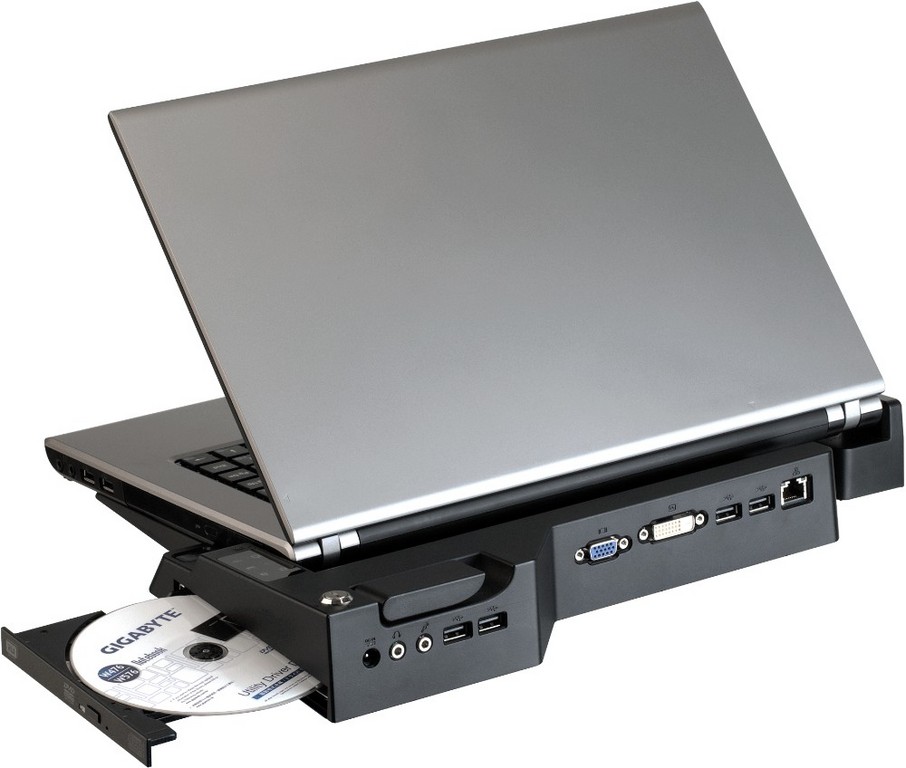
Gigabyte Announched the GS-AH6G3N Business Notebook


The GS-AH6G3N embeds the new LGA1155 Intel platform for mobile products, with the most powerful and efficient processor and chipset for a reliable and durable business notebook. Designed for professional end users, our product includes all the most important features required by a utilization in a business environment. The GS-AH6G3N is therefore a very versatile business notebook, with the highest standard of performance and quality from GIGABYTE. It is nevertheless a stylish product, with an excellent design and ultra-thin profile, as well as a very light weight and a large power autonomy for the smoothest mobility. With its high value features, the GS-AH6G3N has everything to be the best work tool for your daily business life.

The GS-AH6G3N offers all the important features that e good business notebook should have. Probably the most critical feature, the GS-AH6G3N has a power autonomy of about 7 hours, which can be extended to 10 hours with a second battery docked in the swappable ODD bay (this bay can also dock a second HDD).


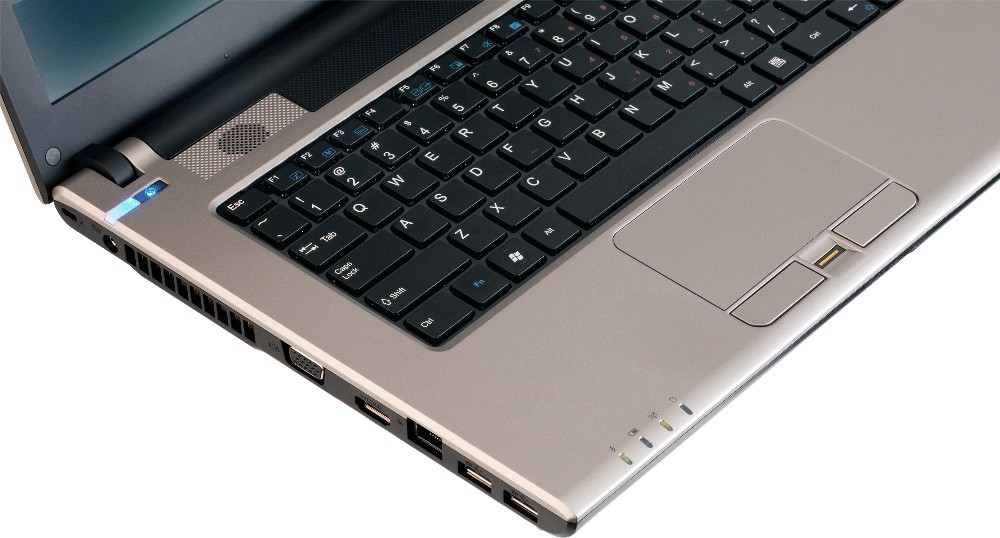
Then, it also includes top quality video conference, with a 1.3Mpx webcam and a digital microphone for the best audio and video quality, as well as a finger print recognition sensor for a fully secured access to the computer. Last but not least, we didn’t forget to think about your mobility with a total weight inferior to 2 kilograms, the GS-AH6G3N is as light as possible to accompany you in your business trips.


Sandy Bridge Microarchitecture
The GS-AH6G3N notebook supports Intel’s new 32nm microarchitecture and the LGA 1155 socket, allowing our product to operate with the new Intel Core processor family, which brings, among others, a 25% performance improvement and lower power consumption compared to the previous CPU generation.

USB 3.0
The GS-AH6G3N includes two USB 3.0 ports, enabling superfast transfer rates of up to 5Gbs. This new technology will make users experience a speed about 10 times faster than the previous USB 2.0, with which USB 3.0 ports will still be compatible. Moreover, USB 3.0 also delivers a 9 times bigger power transfer, which means a much faster charge of external devices such as cell phones, MP3 players, and so on.

Memory
The GS-AH6G3N includes two SO-DIMM connectors supporting DDR3 memory for a maximum of 8GB.

MSI Announces GX780 Gaming Notebook


Eric Kuo, associate vice president for global sales, MSI Notebook, notes that the GX780 not only sports Intel,s second generation Core i7-2630QM quad core CPU and nVidia's DirectX 11-supporting GeForce GT 555M discrete graphics card, it also has four DDR3 slots and accelerated dual hard disk architecture endowing it with impressive computing powers, making it equally suited for the digital content creator as it is for the serious gamer. The GX780 also comes with smart wrap around sound courtesy of Dynaudio and THX TruStudio Pro and a 17.3” full HD high resolution display to guarantee the ultimate multimedia experience.

Serious gamer keyboard
Windows function key relocated: Responding to cries from gamers, MSI got together with gaming equipment manufacturer SteelSeries to create a keyboard for the GX780. Not only is the keyboard more rugged, it has a more solid feel and the Windows function key has been repositioned to the right side to reduce the possibility of accidently striking it when you're hip-pocket deep in ogre blood. Larger Ctrl and Alt keys: Fans of FPS games need to use the Ctrl and Alt keys a lot for such commands as "crouch," "jump," and "pause," but these keys are smaller on most keyboards, making it easier to punch a nearby key by accident when you're going for one of them. With this in mind, the Ctrl and Alt keys were enlarged on the GX780.

Executes 10 commands at once: RTS gamers sometimes need to simultaneously gather resources, build up their areas, develop technologies, and control scouting units as they scour the land for the locations of more resources and the enemy. Due to the large variety of tasks that need to be executed, the player needs to key in one command after another. Many traditional keyboards aren't designed specifically for gamers and don't respond readily to key combinations, adversely impacting your combat capabilities. This doesn't happen on the GX780, because its gaming keyboard allows you to execute 10 commands simultaneously, enabling you to rapidly accomplish several missions concurrently.

Backlighting for the task at hand: The GX780 Key LED Manager lets the user choose from among several keyboard background lighting scenarios, including Normal, Gaming, Wave, Breathing, and Dual Color. Gamers will also appreciate the fact that the frequently used keys W, A, S, D, and Ctrl are all backlit on the GX780, using the latest keyboard backlighting technology. Simply depress the Gaming Mode hotkey at the top of the keyboard to light up the LED backlighting at the bottom left side of the keyboard. The rest of the keyboard remains dark, so you can find the keys you need quickly even in the middle of a white-hot battle.

Dominating the opposition
Intel 2nd Generation Core i7 quad core processor: MSI's GX780 features Intel's most advanced Intel's 2nd Generation Core i7-2630QM quad core processor giving each core clock speeds of 2.00GHz. New generation Intel Core i7 processors support Intel Turbo Boost 2.0 which automatically allocates processor resources to boost core clock speeds and overall computer performance. They also support Quick Sync Video to enhance multimedia file computing performance during conversion, synchronization, and compilation.

Top end nVidia GeForce GT 555M discrete graphics card: The GX780 packs nVidia's new generation high-end GeForce GT 555M with 1GB of GDDR5. nVidia's PhysX® offers gamers a true-to-life visual experience. What's more, it supports DirectX 11 to enhance game resolution, so that even lines in far-off buildings are now visible, making games more realistic.

16GB of memory: The new generation top end GX780 gaming laptop features four DDR3 memory slots for up to 16GB of memory. It also comes with RAID-0 dual hard disk architecture which not only doubles hard drive memory capacity, it enhances read-write speeds by some 70%.

TDE technology: The GX780 uses MSI's own Turbo Drive Engine (TDE) technology, so just one touch of the luminescent Turbo hotkey located above the keyboard instantly revs up performance. It also has MSI's own powerful Cooler Boost technology, so again, just one touch of the luminescent hotkey above the keyboard kicks in the powerful cooling function to rapidly reduce system temp to enhance system stability.

Sporty look, superior multimedia
Supercar-inspired exterior: In the creation of the GX780, MSI was inspired by design concepts found in classy high-end automobiles. The elements incorporated into the overall design and every detail of this machine serves to give these high-performance gaming machines a feeling of professionalism and style. The glowing white letters "MSI" in the center of the cover accentuate the aluminum manganese alloy body's brush metal finish, placing this NB in a class all its own. What you get is a chic high tech texture that exudes awesome power and envelope-pushing style.

Top theater sound technology: To enhance sound performance, MSI joined forces with world renowned sound designers at Dynaudio to study the GX780 meticulously. Even speaker locations and sound field design were calculated with precision. The two firms worked side by side to carry out vast amounts of study and countless calculations to determine ideal locations to install speakers to obtain obstruction-free sound transmission. MSI also worked closely with sound design specialists at Creative to incorporate cinema-grade THX TruStudio Pro wrap around sound which reproduces crystal-clear sound regardless of source.

Full HD display: The MSI GX780 sports a 17.3-inch full HD screen and comes with Cinema Pro technology for a crisper picture and richer colors. It also has an HD720p webcam, so you can engage in clear, hiccup-free video conferences with friends and family anywhere in the world.

Latest USB3.0 ports: The GX780 comes with USB3.0 which boasts transfer speeds of 4.8Gbps—10 times faster than USB2.0, so a 25GB HD film transfers in just 70 seconds. It also provides 80% more power for vastly faster charging speeds for external hard drives, flash drives, and other handheld electronic devices.

12 May, 2009

Fujitsu LifeBook P8020 Review

Fujitsu currently makes 18 notebook models for the US market ranging from the 16-inch LifeBook N7010 desktop replacement to the extreme ultra portable 5.6-inch LifeBook U820. Many of these models are Tablet PCs that feature either swivel convertible or the slate designs. While many notebook makers, most noticeably Apple and Sony, have left the 12.1-inch notebook market, Fujitsu thrives on it largely thanks to touch screen Tablet PC technology. Aside from the two slate style 12-inch notebooks, Fujitsu offers 2 convertible Tablet PC models and two non-Tablet PC models in 12.1-inch size. In some ways, this helps ultralight notebook shoppers decide which model fits their needs and desires. To further separate the two non-Tablet PC models, the LifeBook P8020 and the LifeBook B6230, Fujitsu gave the P8020 the faster Intel Core 2 Duo SU9400 (Penryn) processor and a super-light chasis that weighs only 2.9 pounds. In contrast, the B6230 has the Intel Core 2 Duo Ultra Low voltage U7600 (Merom) processor, a touch-sensitive screen and a heavier (3.2 lbs), more durable magnesium-alloy body.

Fujitsu P8020 notebook

The Fujitsu LifeBook P8020 runs on the Intel Core 2 Duo processor SU9400 at 1.40GHz with 2GB memory and a 160GB hard drive. Since the Fujitsu P8020 is available build-to-order, you can up the ante on the memory and hard drive to 4GB of memory and up to 320GB HDD or a 128GB SSD if you have the cash. For example, if you upgrade the notebook’s memory to 4GB and the storage option to 128GB SSD, the price jumps from $1,799 to $2,899.

Design and Ergonomics

Compared to the Toshiba Portege A600 12.1-inch notebook, the Fujitsu LifeBook P8020 is a light one. Measuring 10.79 x 8.27 x 1.12 inches and weighing 2.9 pounds, the LifeBook P8020 is both slimmer and lighter than the Portege. The notebook has a matte black body with a shiny piano black lid that adds a touch of style while still being suitable for business. If you’re looking for a business-oriented notebook that’s easy to carry, the Fujitsu feels incredibly light in hand yet isn’t too small for spreadsheet work and web surfing in readable font sizes.

The 82-key US keyboard feels good to type on and has both adequate travel and tactile feedback when you press the keys. The keyboard has a normal layout. The touchpad below the keyboard is a bit different: it supports gesture touch. For example, you can pinch in and out with two fingers on the touchpad to zoom in and out on a page, similar to recent Apple MacBook models’ trackpads and the iPhone’s touch screen. You can also use the touchpad to scroll pages using the right-edge of the touchpad or draw circles on the touchpad. While we liked the cool gesture support, we found the cursor tended to drift even after we stopped using the touchpad. Annoying. Unlike many notebooks’ smooth touchpads, the Fujitsu’s touchpad has a “rough” surface and it sits almost flush with the wrist rest area, both of which take some getting used to.

The fingerprint reader lives between the two mouse buttons, and works with the embedded TPM. The system LED lights live above the keyboard next to four quick launch buttons that launch Support, Power saving mode, Presentation mode and web browser. The notebook’s power on button is conveniently located here as well, next to the quick launch buttons, and the notebook’s dual speakers flank the LED and menu buttons. The 1.3 megapixel webcam is integrated in the bezel above the display.

11 May, 2009

Fujitsu LifeBook U820 Review

Fujitsu released the 2nd generation U820 at the end of 2008 with updated specs and a GPS. How does it look against the competition?

Fujitsu U820

With a starting price of $1,049 it's obviously priced out of the cheapie netbook category and instead joins the ranks of the higher end UMPCs and micro PCs with second generation Intel Atom processors, namely the the OQO model 02+ and Sony Vaio P. The Sony Vaio P is actually slightly lighter at 1.4 lbs. and is considerably thinner-- thin enough to slip into a back pocket but long enough at 9.65 inches that it sticks way out of that pocket. The Vaio P lacks a touch screen and tablet features so if those are important to you, that narrows the selection down to the OQO model 02 and Fujitsu U820. The U820's keyboard is very small, but it's still a traditionally designed keyboard unlike the OQO which has a BlackBerry-esque thumb board. The U820 also features unbeatable battery life thanks to the high capacity 5200 mAh Lithium Ion battery that gives the U a Quasimodo hump.

Compared to budget netbooks like the Aspire One and Eee PC, the Fujitsu offers a lot: incredible small size and half the weight, super battery life, a 1.3MP webcam, GPS (and a good one too) with Garmin Mobile, Bluetooth 2.1 + EDR, Atheros WiFi 802.11n (most netbooks only do 802.11b/g) and a higher resolution display.

In terms of looks, the U820 looks and feels well made and we like the black glossy top compared to the U810's plainer lid. We also like the all-black sides compared to the silver trim on the U810. The high capacity battery looks strange sticking out the back but it does make a great carry handle and it allows the machine to run for up to 7 hours! In all respects, the U820 looks like a teeny-tiny traditional convertible notebook. It has a clamshell design with a miniaturized notebook style keyboard, ports on the sides and front, a wireless slider switch and LED indicators for charging, wireless and hard disk activity. At 6.73 x 6 x 1.46 inches, it's quite small but thick.

Obviously, a 5.6" display miniature Windows PC is a niche item. If you need a Windows computer most everywhere you go, the Fujitsu U820's light weight and small size are easy on the back and it's so small it doesn't scream "steal me" like a full size notebook. the U820 is capable of MS Office work, email, web and all manner of lightweight tasks. Just don't expect desktop replacement performance-- in fact, don't expect to use it as a portable video player either. The market has changed since the U810 came out in 2007 and now the U820 faces stiff competition from the OQO model 02+ and the Sony Vaio P. It's no longer considerably cheaper than other makes and the OQO is even more portable while the Vaio P has a very usable touch-typeable keyboard, wider screen, integrated EVDO Rev. A and drop dead good looks. What the Fujitsu U820 does offer is extreme battery life (the Vaio P with an extended battery falls an hour short of the U820) and a familiar notebook PC design.

Pro: Incredibly portable! Fantastic battery life.

Con: High resolution on a 5.6" display means text is too tiny, even if you have good eyes. Digitizer doesn't want to recalibrate to a lower display resolution. Expensive and adding desirable options like 3G and an SSD drive really drive the price up. Not really touch-typeable unless you're thin-fingered and very coordinated.

Price: $1,049 for base model with 60 gig hard drive, $1,299 for the 120 gig hard drive model. Add $1,100 for a 64 gig SSD.

Specs:

Display: 1280 x 800 pixel color touch display (passive, resistive). Screen size diagonally: 5.6". Intel GMA 500 integrated graphics using up to 224 megs shared memory.

Battery: 4 cell 5800 mAh 7.2v Lithium Ion rechargeable. 37.4 watts/hour, claimed runtime: up to 7.5 hours. Large power brick included (world charger 100-240v AC). Smaller 2 cell 2900 mAh battery available separately.

Performance: Intel Atom Z530 running at 1.6GHz processor. 1 gig DDR2 533MHz RAM. 60 or 120 gig 1.8" 4200rpm ATA hard drive (ours was a 120 gig Toshiba). 64 gig SSD is optional.

Size: 6.73” (W) x 6.14” (D) x 1.16-1.46” (H). weight: 1.56 pounds.

Camera: 1.3MP webcam.

GPS: Integrated GPS (made by Kyocera) with Garmin Mobile software bundled. Comes with external car antenna.

Audio: Built in speaker, mic and 3.5mm standard stereo headphone jack. RealTek ALC269 HD audio.

Networking: Atheros XSPAN WiFi 802.11a/b/g/n, wired 10/100 Ethernet via included dongle and Bluetooth 2.1 +EDR. AT&T HSUPA broadband is optional for $150 and requires purchase of the 120 gig hard drive model or the SSD model.

Software: Windows Vista Home Premium and Windows Vista Business available. Vista Business includes a downgrade to XP Tablet Edition when purchasing 25 or more U820 computers per year. MS Works 9.0, Microsoft Office One Note 2007, MS Office 2007 60 day trial. MS Origami for Vista, OmniPass fingerprint scanner security software, Adobe Reader 8, various Fujitsu utilities and ArcSoft WebCam Companion 2.

Ports and Expansion: 1 SD slot and 1 Compact Flash I/II card slot. 1 USB 2.0 port, 3.5mm stereo out and mic in ports, port for docking station/dongle adapter which has VGA and Ethernet ports.

Security: Integrated Fingerprint Sensor and embedded TPM. Boot Sector Write Prevention and BIOS passwording. AuthenTec fingerprint scanner and OmniPass software for Windows. BIOS support for Computrace/LoJack.

Web Site: www.computers.us.fujitsu.com